Showing posts with label Google Drive. Show all posts

Wednesday, August 17, 2022

Students Talking in Math: Activity to Get Students to Talk about Math

My favorite thing about teaching is hearing students talk about math. It is what brings me joy as a math teacher. But believe it or not, math is not a student's favorite thing to talk about. 

Why should students talk in math class?

  1. Students want to talk! I want to give them as many opportunities to talk as possible-and keep it on topic as much as possible. 
  2. When a student says something out loud, it helps solidify it in their brain.
  3. When students hear their classmate say something out loud, they remember it better. 
  4. Speaking about math helps students clarify what they are thinking until they understand it. 
  5. Students will be more engaged when they have opportunities to talk to each other. 


Unfortunately, most students don't come to math class knowing how to talk about math and need scaffolding to get where we want them to be. 

One of the activities I have used to scaffold conversations about math is a True/False response. Each student gets a red and green card. They could also have different colored post its. Two colors are better so you can easily see the responses from the class. 

Before starting the activity, explain to students they are going to read the statements and determine if they are true or false. BUT, they cannot tell the class. Instead, they will turn to their neighbor or group and share their response. If students disagree, they will explain to each other why their answer is correct. If they change their mind, great. If they don't change their mind, great too. They don't have to be successful at convincing each other, the most important thing is talking. 

You put up a prompt--this can be done with any topic. I have an example below. 


Students talk with their neighbor group. When you are ready--give 1-2 minutes-tell everyone to hold up their red card for false and their green card for true. (Or whatever colors you have chosen)

These are low-stakes conversations. Students don't have to talk long--but any talking about math is a good start. The more confident they feel in their skills, the more they will talk. 

Click here to access a free True/False activity about integer operation models. 

Interested in other math activities? This has warmups for several 6th grade math topics that encourage students to talk about math. It can be used for STAAR review but also works throughout the year. 


Sunday, January 3, 2021

Introduction to Inequalities with Desmos and Real-World Situations

 I think introducing inequalities is so much more interesting and fun than equations. There are so many more real-world situations that students can relate to. 

"Your mom says she will give you no more than $20 for lunch this week. How much money could she give you?"

"You need to be at least 48 inches to ride the roller coaster. How tall could you be and still ride it?"

"The elevator can hold up to 750 pounds. How much can the elevator hold?"

You can have some fun discussions with your students and even those students who struggle with math can participate because it is something they can relate to. It is  great way to help students build confidence. Math isn't just a set of steps and algorithms--its a way to explain the world around us. 

So this year, I was in the classroom because of lack of substitute teachers and got to start the inequality unit with some 6th graders. These are the two activities I used with students. (My campus currently has enough devices for every student.)

1. Desmos Inequalities on a Number Line

Have you used Desmos? You might know it as an online graphing calculator, but it is so much more. There are lessons on there that you can walk students through, see what they are doing in real-time, and give immediate feedback. 

The assignment I have linked has students place value on the number line with prompts like "a number less than 3." This starts students thinking about how there are multiple numbers that fit that prompt. One class would only every pick whole numbers and I had to push them to see 1.5 as a value they could select. 

Eventually this assignment shows students how we use a shaded number line to show all possible solutions. 

2. Google Slides Beginning Inequalities

Next, I had students look at some real-world statements on the board and place possible solutions on the number line. I had several students come up to the board and use a marker to mark their possible answers. Again, all students were able to participate because theses were situations they experienced in their daily lives. 

Now I know that when we get into solving and writing inequalities, that students may struggle. But by starting the unit with some low floor activities, the students can build their confidence and it is something I can continue to refer back on. 


Friday, September 18, 2020

Modeling Adding Integers with Algebra Tiles Free Google Drive Resource

 Virtual. Learning. 

Remote. Learning.

Distance. Learning.

Online. Learning.

Whatever your district calls it--this isn't easy. Not that I expected it to be. But this is just so much harder than I thought. There are so many decision to be made as new circumstances come up. I worry that our online learners aren't getting what they need. I worry about our in-class learners. I worry about my math teams and the stress they are under. I am constantly worrying. 

Hopefully in a year we can all look back on this time glad that school is filled with students talking, laughing, not on the computer all day long, etc. 

We've been working on our integer operations lessons. I filmed a video today with my favorite lesson that really needs students talking to work! I was just sitting at my desk talking to myself about the excitement that is integer operations <--that is not sarcasm. 

I love algebra tiles so much. When I first learned out them 7 years ago, I loved them. Where were these when I learned algebra, where all my math problems began!

If you aren't using algebra tiles or colored counters to teach integer operations--start now. 

This assignment has students model simple addition expressions, create zero pairs, and simplify the expression. 

Modeling adding integers with algebra tiles free google drive resource


Click here to copy the activity into your Google Drive. 

Modeling adding integers with algebra tiles free google drive resource


Sunday, September 6, 2020

Using Integer Vocabulary to Get Students to Talk in Math | Free Resource

I don't like just introducing new concepts in math without talking about real-world implications. When introducing integers, we start with talking about vocabulary that show positive and negative situations. 

Integers Vocabulary

On the day you introduce integers, display this slide to your class and ask them to pick one word with their group that means positive and one that mean negative. 

Having your students talk in math class is important. Not just to explain math, but to build skills of sharing ideas in respectful ways with their classmates. This is a low floor questions where most students will be able to find at least 1 word that they can explain as positive or negative. It is also important for ELLs to practice their academic vocabulary with their peers. 

Talking in math class doesn't always have to be about explaining how to solve a problem. This is still math talk! It will also help students be able to connect math class to outside the classroom. 

You could even extend this to a writing activity and have students write what about the words their groups talked about. 


Wednesday, September 2, 2020

Fraction Decimal Percent Google Slides Digital Assignment

 Are you are trying to figure out virtual learning and face-to-face learning at the same time? Is your school doing just virtual learning? No matter what your situations, the 2020-2021 school year will be one to remember. The first few weeks of school have been exhausting and overwhelming. 

I want to do what I can to help. I wish I could do more! 

This resource has students look at models and name the fraction, decimal, and percent modeled. 

Fraction Decimal Percent Models

Click here to download to the Free Activity

Fraction Decimal Percent Digital Task


Thursday, August 27, 2020

Multiply or Divide Decimals Word Problem Sort | Google Classroom Resource

I have learned a lot about using Google Drive to create resources for math the last few months. My district does not use Google Classroom, but we do use an LMS that allows Google Drive resources to be assigned. 

When students read word problems, they may struggle with deciding on what operations to use. Throw some decimals in there, and some get really confused. 

I made this sort in Google Slides. It has 10 word problems which similar situations. Students have to sort them into columns based on whether they will use multiplication or division to solve. 

Multiply and Divide Decimals Word Problems

When I introduce this topic to students, I ask them to do 2 things. 

1. Replace the numbers in the word problem with whole numbers. Does that make it easier to decide the operation to use?

2. Look for the Total. Do you have the total? Or are you looking for the total? If you have the total and you are splitting it into equal groups, it is division. If you are looking for the total and you have equal groups you need to combine together to get the total--its multiplication. 


Multiply and Divide Word Problems Sort

Thursday, February 28, 2019

Rock Cycle Resources

Teaching the rock cycle can be fun. Even though it is a real-life process that takes millions of years to observe, there are many ways to model the rock cycle.


This lab uses chocolate, butterscotch, and white chocolate chips to model sedimentary, metamorphic, and igneous rock formation.

If you have some broken crayons (what teacher doesn't), this lab uses crayons to model the three types of rock formation.

Love starburst? This lab uses starburst to model the processes.

(I did not create any of these lab. I just found them on the web.)

Types of Rocks Foldable


Digital Types of Rock Sort on Google Drive


This interactive webpage overviews types of rocks and the formation. There is also a little quiz at the end. 


Saturday, January 19, 2019

Fraction Decimal Percent--Equivalent Numbers Practice Freebies

I feel like it takes students all school year and then some to remember how to convert between fractions, decimals and percents.

In Texas, we start with generating equivalent numbers in 6th grade: the time when some teachers and students think math manipulatives and models are no longer needed. I strongly disagree. I struggled with math in school (which I believe is what makes me love teaching math now) and I don't ever remember working with math manipulatives or math models. No fraction models, algebra tiles, cuisenaire rods, etc. When I started teaching and understood the models myself, I understood the concepts so much better. The first time I saw dividing fractions modeled with cuisenaire rodes in grad school, I was blown away!

All this to say, don't think 6th graders (or older) are too old for models and manipulatives. Some students may not need them and other will. But don't make that call for them.

When it comes to generating equivalent forms of fractions, decimals, and percents, students have a hard time understanding that the numbers really are equivalent. They are different ways to tell the same story. So I always start with models.

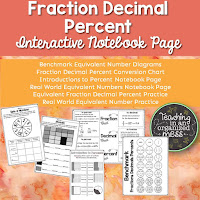
At this point students have worked with fractions and decimals and have probably heard to percents, but don't understand what they are. I start with a mini presentation to get the conversation going about what percents are. (Click the link to make a copy to your Google Drive)


And we practice. Over and over and over again. I use notebook pages like this that students can refer to as they practice.

Practice starts simple. I write fraction, decimals, and percent on index cards, pull students to work in small group, give them so dry erase markers and start converting. They work the problems on the small group table and I get to see where students are running into problems.

Fraction Decimal and Percent conversion is a skill that students revisit all year long, so I need lots of different ways to keep students practicing. Download this sheet here  for more practice. 


Other Fraction, Decimal, Percent Resources


Friday, January 11, 2019

Valentine's Day One-Step Equation Escape Room

In my last post I share how to use Google Forms to create a digital escape room.

I made one for Valentine's Day where you can see that in action. I made the task cards in Powerpoint, saved the photos as JPEGs, then uploaded them to a Google Form. I used the Response Validation Option to require students to put in the correct answer before they can move on.


You can download the freebie here


Inside the file is a link to copy the form into your Google Drive. If you use Google Classroom, this allows you to see who completed the escape room. 


Tuesday, January 1, 2019

Digital Escape Room through Google Forms

Has the craze of escape rooms hit your school yet? We started using them for STAAR review last school year and they were a hit. Even if the challenges were something the students would do in a station or as an assignment, suddenly putting it into an escape room made it fun and exciting.

There are a few ways to do escape rooms. On my campus, we've used Notebook from Outlook to "lock" pages and Google Forms available on Google Drive. Even if you have a paper escape room, it is possible to add questions, or question numbers to a google form to have students verify answers and codes themselves.

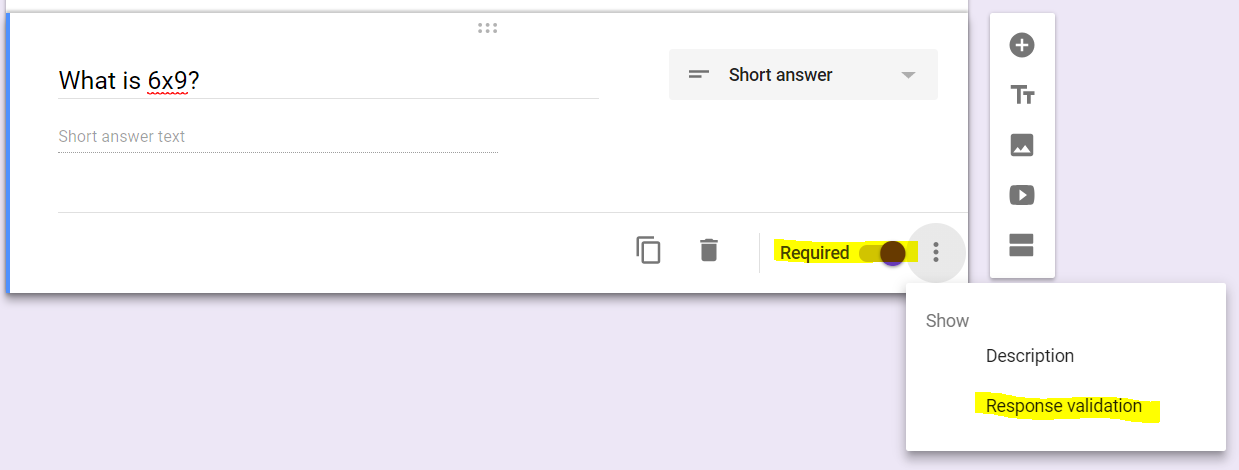
It is pretty easy to set up on Google Drive. I have some screenshots below to show how to require students to input a specific answer before they can move on to the next question.


1. Start a new Google Form in Google Drive. 

2. Type in the title and the question. Change the answer type to short answer. 

3. In the bottom right hand corner of the question, there are 3 dots. Click on it and select "Response Validation". Also make sure to select "Required" so students can't skip the question. 

4. Once you turn on "Response Validation" several option come up. The one I use most often is to select "Number" and "Equal To". I have also used "Text" but since the option is "Contains" it is possible that if a student puts in ABCD but the answer is really BCD, google will say it is correct because their answer contained the correct one. There are ways around it, but using numbers causes less errors. 


5. Put in the correct answer and type in your Custom Error Text. If you don't type in a custom message, the students might not know they need to fix their answer. 

Continue adding questions. You can actually type in all the questions with open-ended responses or just put the question numbers and the correct answers and students fill in from there. 

I'll share some more ideas for Escape Rooms in another post--like what type of activities make good escape rooms!


If you are interested in some pre-made escape rooms, I have some in my TPT Store here.


Sunday, November 1, 2015

Order of Operations

I am starting order of operations with my students tomorrow and Tuesday. I prefer not to just jump into algorithms with students without hooking them in or giving them some kind of real-world reason they are learning a new skill. 

Before teaching, my understanding of order of operations was the some people made some rules, decided that multiplication had to be done before addition and we all just blindly follow. Who "they" were was unclear to me. 

When we teach order of operations by just giving an expression and asking students to evaluate it, that is essentially what we are teaching: We are saying that these are just some rules you need to memorize. 

However, as I tell my students, in the real world there aren't signs that make you solve a math problem before you enter a room. Or you don't have to prove you can multiply before you take your driver's test. Instead, math comes up and you have to be able to take all you have learned and decide what is useful in that situation. 

So instead of telling students the order of operations, I introduce them to real life situations and ask them to write numerical expressions that tell the story with numbers. Then I ask them to evaluate those expressions using the knowledge they have of where the expression came from. My students learned order of operations last year without exponents, so they are not completely new to it.

I have created a presentation on Google Slides that will be the lesson I do with my students. 


Use it if you would like. If you would like to make changes to it, go to File and then Make a Copy for yourself to save to your Google Drive. 

Friday, October 23, 2015

Age and Absolute Value


I read about an activity this summer to introduce absolute value to my students. It came from a Dan Meyer blog post

I introduced this as a game. I posted pictures of celebrities and students guessed their age. Then I posted the real age of the person and student recorded that next to their guess. 


We had to decide as a class who the winner was. I asked the students how we could decide. Depending on what students came up with at first, I would prompt them with questions. 

Eventually, I wanted them to say that they would calculate the difference by subtracting the guess from the actual age. If their guess was under, they would have a negative score. If they guess over they would have a positive score. 

Now, we had to decide who was closer. If we added all the scores, then the negatives and positives together would make the score seem less than it actually was. 

So now, I needed the students to decide to just calculate how far away from the real age they were. If they guessed the right age, their score would be zero. If they guessed one year over or under, their score would be one. Then I would connect this to absolute value and the number line. Again, depending on the class and what the students said, I had to guide them through questioning. 

Here is the Google presentation I use. You can see it and Make a Copy if you want to make any changes and have one for yourself. Go to File, then Make a Copy and it will be saved to your Google Drive. 

(If you aren't using Google Drive, you should be. I hated it at first, but I love it now). 

I did have a picture and my age in the original one. If you are comfortable sharing your age, you could add your own. 


Related Posts Plugin for WordPress, Blogger...