Showing posts with label Tips and Tricks. Show all posts

Sunday, September 6, 2020

Using Integer Vocabulary to Get Students to Talk in Math | Free Resource

I don't like just introducing new concepts in math without talking about real-world implications. When introducing integers, we start with talking about vocabulary that show positive and negative situations. 

Integers Vocabulary

On the day you introduce integers, display this slide to your class and ask them to pick one word with their group that means positive and one that mean negative. 

Having your students talk in math class is important. Not just to explain math, but to build skills of sharing ideas in respectful ways with their classmates. This is a low floor questions where most students will be able to find at least 1 word that they can explain as positive or negative. It is also important for ELLs to practice their academic vocabulary with their peers. 

Talking in math class doesn't always have to be about explaining how to solve a problem. This is still math talk! It will also help students be able to connect math class to outside the classroom. 

You could even extend this to a writing activity and have students write what about the words their groups talked about. 


Sunday, July 14, 2019

10 Grading Tips for Teachers--How to Keep Grading Manageable and Fair

When I was younger, I loved grading papers. It was one of the things I was looking forward to when I become a teacher. I would have one of those sliding grading things and some cool pens and grading would be so fun!

That got old real quick. I like going through student work to get an idea of what they understand and where to take my instruction based on that data.

However, the process of collecting work, grading it, entering grades, passing back assignments...not something I enjoy.

Over the years, I improved my grading process so that it didn't consume so much of my time but still provided students with feedback that needed.


Here are my tips to make grading work for you without causing you unnecessary stress.

Know your district/school/department grading policy

Most schools will probably tell you at the beginning of the year. It should tell you how many grades are required, how many should be test/homework/daily, if students are allowed to redo work, etc.

Know when progress report and report card grades are due

...and don't wait until the last minute to enter grades. Not only will it be stressful at 4 pm to enter grades on the day they are due at 4:30. That will certainly be the day your computer starts acting up. I had a goal to enter 1-2 grades per week. Students and parents probably have online access to their grades and parents especially expect grades to updated regularly. It also isn't fair to a students who had an A the first week of grades to now be failing after a teacher waited 3 weeks to enter grades again. So, keep on top of it. 1-2 grades a week isn't unmanageable.

You also should wait to long because you are depriving students of feedback. One purpose of grades is for students to know how they are preforming in your class. If you only do two batches of grading in a grading period, students are not getting the proper feedback they need. (There are other ways to give feedback (I'll discuss later) If you are doing those other forms, use them as grades!

Don't grade students on responsibility

Some teachers won't agree with this one. I don't count off for late work. That's grading responsibility. There can certainly be other consequences: call home, lunch detention... but if a students doesn't turn in an assignment, I am not going to count off because it is late. I grade to know if they can do the work.

Let students fix their grades

You can let them make corrections of work you have passed back OR let them replace a grade with another assignment on a similar topic. For example, if a student got a 50 on an assignment about order of operations but then a week later did another assignment on order of operations and got an 80 -- I replace the first grade with the second grade. If the purpose of a gradebook reflects a student's understanding of the subject, that 50 is no longer an accurate reflection.

Find ways to make grading quick

Use SeeSaw, Quizizz, Self-Checking Assignments (like coloring pages), shortened assignments. Spot check assignments too. If a student can do the first 10 problems correctly, then possibly that's enough to know if they got it.

You don't have to grade everything. 

You just don't.

Don't take formative assessments as a grade

...unless you are willing to give students a similar assessment to improve their grade. The point of a formative assessment is to see where students are at and then to adjust your instruction. So students might not be ready for assessment and it isn't really fair to base their grade off of it.

Differentiate the assignments you take grades for. 

We have to standardized our state testing--but not in the classroom. If you only take grades on multiple choice assignments, you aren't letting some students show their potential. Have a variety of ways for students show what they know. Including verbal responses! If I pull a student for small group and they do a wonderful job explaining how to convert from a fraction to a percent -- I'll take a grade.

Try not to take grading home. 

If I took grading home over the weekend, it usually sat in my bag and made me feel guilty for not touching it. So make time to do it in 10-15 minutes bursts during the week.

Have student helpers

The worst part of grading for me was remembering to pass it back. I would always remember as students were leaving my room. So I created a file folder for each student and would give stacks of graded papers to students to file before or after school. Then I could just hand each student a stack of their papers. This also made it easy to make copies of students work that I was tracking for RtI or their IEPs.

My opinion on grading throughout my career has changed and I am sure it will change again before I finish. To be quite honest I think we should get rid of grades, reduce class sizes to 12-15 and have report cards be like Kindergarten ones that explain in words how a student is doing in class.

What are your thoughts on grading? Anything you agree or disagree with?

Tuesday, January 1, 2019

Digital Escape Room through Google Forms

Has the craze of escape rooms hit your school yet? We started using them for STAAR review last school year and they were a hit. Even if the challenges were something the students would do in a station or as an assignment, suddenly putting it into an escape room made it fun and exciting.

There are a few ways to do escape rooms. On my campus, we've used Notebook from Outlook to "lock" pages and Google Forms available on Google Drive. Even if you have a paper escape room, it is possible to add questions, or question numbers to a google form to have students verify answers and codes themselves.

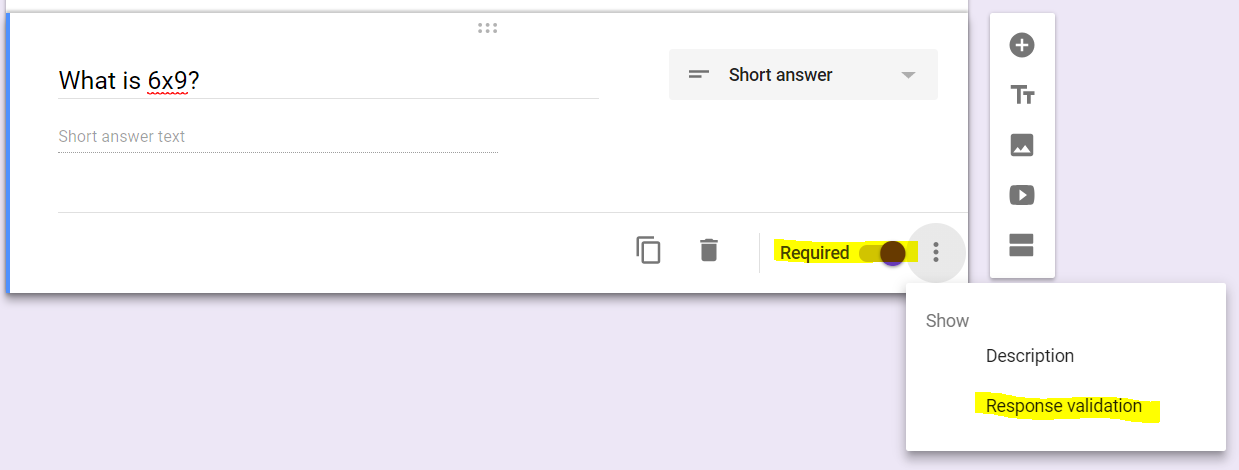
It is pretty easy to set up on Google Drive. I have some screenshots below to show how to require students to input a specific answer before they can move on to the next question.


1. Start a new Google Form in Google Drive. 

2. Type in the title and the question. Change the answer type to short answer. 

3. In the bottom right hand corner of the question, there are 3 dots. Click on it and select "Response Validation". Also make sure to select "Required" so students can't skip the question. 

4. Once you turn on "Response Validation" several option come up. The one I use most often is to select "Number" and "Equal To". I have also used "Text" but since the option is "Contains" it is possible that if a student puts in ABCD but the answer is really BCD, google will say it is correct because their answer contained the correct one. There are ways around it, but using numbers causes less errors. 


5. Put in the correct answer and type in your Custom Error Text. If you don't type in a custom message, the students might not know they need to fix their answer. 

Continue adding questions. You can actually type in all the questions with open-ended responses or just put the question numbers and the correct answers and students fill in from there. 

I'll share some more ideas for Escape Rooms in another post--like what type of activities make good escape rooms!


If you are interested in some pre-made escape rooms, I have some in my TPT Store here.


Monday, November 30, 2015

Instant Feedback Part 2

So we all agree that giving students feedback on their work is important. (see this post) AND the fast you can give it, the better.


Using technology is an easy way for students to get feedback. Most apps that students would use to practice fluency and new skills gives them immediate feedback.

Most new math textbooks now come with online access for students. Even if most of your students do not have access at home to the internet, you can still give them to option to complete homework online.

However, not every one has access to technology. I am extremely lucky to have 10 working computers and 10  ipads in my room which we use on a daily basis. However, not every classroom has technology and there might not be an app or activity online that covers what you are doing. There are still activities students can do.

Fill in a Riddle

There are several resources where students solve a riddle by completing math problems. We use Pizzazz books on my campus and there is basically practice sheets for every concept we teach. As students solve the problem, they find their answer. If the answer isn't there, then they know they made a mistake. 

QR Codes


There are so many ways to use QR codes in your classroom. You will need a device that has a QR code reader on it. You can have task cards where students do the work and then scan the code to check their answer. You can add QR codes to the end of a worksheet where students check their answer.

You can have card sorts where students have to match cards where each card has one half of the QR code and then when they match the card they put the QR code back together. If it scans, the answer comes up correct. If the QR code doesn't scan, then it isn't the correct answer. Just google QR code math activities ( or any subject) and see what comes up.

Color by Number

Even middle school students will color. This is similar to the riddle. The students solve a problem and if they find their answer on the picture, they know they are correct. With this, along with the riddle, students can easily get the riddle and picture by copying. Make sure to require students to show their work.

Graphing Picture

To practice graphing, mystery pictures provide lots of practice and students can see by the end if they have a picture or just a jumble of points. These mystery pictures do not just have to be ordered pairs. There are some that make students solve a problem before getting the ordered pair. For example, (-3+-4, -5+2) is the ordered pair (-7, -3).

What other ways have you found that help students see if they are on the right track?

Monday, September 28, 2015

CHAMPS

My campus is a CHAMPS campus.  It is a classroom management system which includes many ideas for managing a classroom.

My favorite part of CHAMPS is having teachers prevent problems before they start. Putting procedures and expectations in place that prevent the most common classroom problems before they even start. If you are struggling for classroom management (which I would say the area I always have to work hard at), I would suggest looking into the CHAMPS Positive Behavior Support.

I have this poster hanging in my room and the students have a copy in their interactive notebook. It tells students what they are expected to do during each type of activity they will do in math class. I have seen this displayed in different ways, but this was the least amount of work for me.

If you would like to use this, you can get it here in Google Drive. Save it as a Copy and then you will be able to edit as you wish.

Mostly at the beginning of the year, I go over this with students every day before every activity. It is one of those beginning of the school year things that gets tedious, but necessary.
Math Review=Warm up
Guided Math=Small Group/Station Time

My campus also uses Voice Levels that are consistent everywhere. Voice Level 0 is no talking, Voice Level 1 is Whisper, Voice Level 2 is conversation, Voice Level 3 is Presentation and Voice Level 4 is outside. Students need to be taught and shown what voice level is appropriate for each type of activity and what is expected of them.

When we were being trained on CHAMPS, we watched videos from the creator Randy Sprick. He shares an experience with a first year teacher. While observing her in an unruly class, she told her students to stay in their seats and work independently. However, if students needed help, some talked to their neighbor which she allowed, some got up and asked her questions, which she sometimes allowed and sometimes told them to raise their hand and she would come to them. Basically, her expectations changed from one minute to the next and the students did not know what was expected of them.

CHAMPS gives teachers a way to decide on expectations they want to have and share them with the students.

Thursday, March 20, 2014

Sharing Links Help

I need suggestions.

I have a bunch of links to online interactive science games that I would like my students to have access to. Ideally, I would like them to be able to go to a website, click on a topic and then see all the games/videos/websites available for that topic.

Does anyone have a suggestion for something that I can use. If I knew HTML and more about blogger (my goal for the summer) then I could probably add it to this blog. But I want my students to have access to it this month as we review for our STAAR test.

Thanks for any suggestions!

Wednesday, July 18, 2012

Magic Trash

Sometimes my classroom can be a total mess at the end of the day. Especially if the scissors come out. Sometimes I just feel so embarrassed when the janitors come in so I try to make it looks as clean as possible.

I saw this idea somewhere last year, tried it and it worked so well.

At the end of the day when we are doing dismissal procedures, I secretly pick a piece of trash on the floor. Then I tell my class that whoever picks up the magic piece of trash gets a prize. (I use a piece of gum.)

Those who want to participate, usually most of the class, quickly get up and pick up every piece of trash in the room.

This works perfectly because if I wanted to reward someone who usually doesn't get rewards, no one has to know which piece of trash I really picked.

If I were a better teacher, I might be able to get students to pick up trash just because it is there. But that is an improvement I'll focus on further in my teaching career.
Related Posts Plugin for WordPress, Blogger...