Showing posts with label Technology. Show all posts

Tuesday, January 1, 2019

Digital Escape Room through Google Forms

Has the craze of escape rooms hit your school yet? We started using them for STAAR review last school year and they were a hit. Even if the challenges were something the students would do in a station or as an assignment, suddenly putting it into an escape room made it fun and exciting.

There are a few ways to do escape rooms. On my campus, we've used Notebook from Outlook to "lock" pages and Google Forms available on Google Drive. Even if you have a paper escape room, it is possible to add questions, or question numbers to a google form to have students verify answers and codes themselves.

It is pretty easy to set up on Google Drive. I have some screenshots below to show how to require students to input a specific answer before they can move on to the next question.


1. Start a new Google Form in Google Drive. 

2. Type in the title and the question. Change the answer type to short answer. 
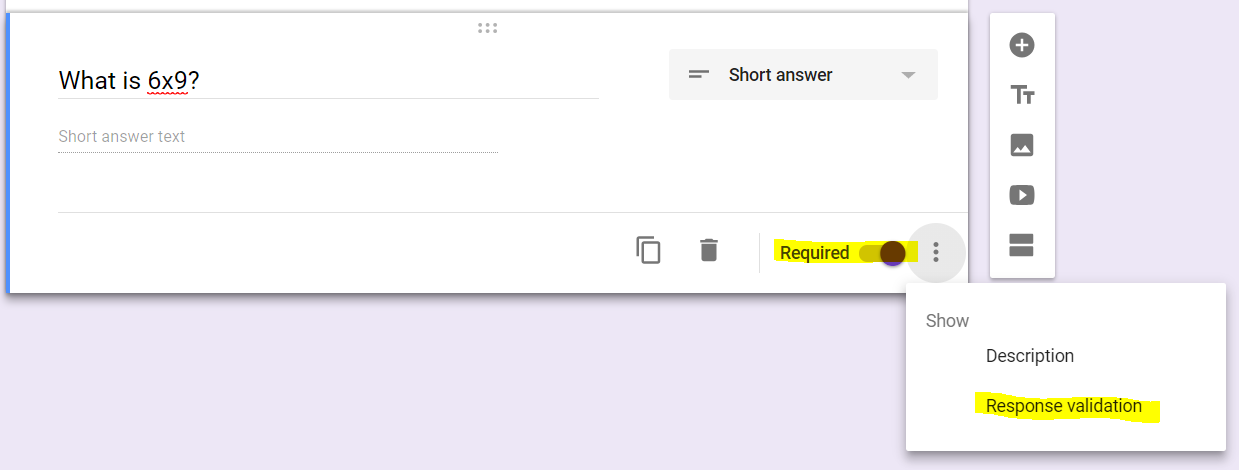
3. In the bottom right hand corner of the question, there are 3 dots. Click on it and select "Response Validation". Also make sure to select "Required" so students can't skip the question. 

4. Once you turn on "Response Validation" several option come up. The one I use most often is to select "Number" and "Equal To". I have also used "Text" but since the option is "Contains" it is possible that if a student puts in ABCD but the answer is really BCD, google will say it is correct because their answer contained the correct one. There are ways around it, but using numbers causes less errors. 


5. Put in the correct answer and type in your Custom Error Text. If you don't type in a custom message, the students might not know they need to fix their answer. 

Continue adding questions. You can actually type in all the questions with open-ended responses or just put the question numbers and the correct answers and students fill in from there. 

I'll share some more ideas for Escape Rooms in another post--like what type of activities make good escape rooms!


If you are interested in some pre-made escape rooms, I have some in my TPT Store here.


Tuesday, January 5, 2016

Math Rings

Another FREE APP: Math Rings. 

In this app, students move the rings so that when you read the equation across, the equation is true. There are dozens of levels so anyone probably won't run out stuff to do. 


Tuesday, December 1, 2015

Card Clutter

Another FREE app. Algebra Card Clutter.  At first glance, it seems very basic. But it provides good ordering practice for students. 

Basically, students order numbers as fast as they can. It start pretty simple with just natural numbers, but then it gets progressively harder adding different types of numbers. 

Students are timed as they go and work up the levels. 

Wednesday, November 25, 2015

Instant Feedback Part 1

As part of my master's program I had to do a large research project. I researched whether using technology in the math classroom would improve student attitudes about math and increase their confidence in math. I used student surveys before and after a unit using our online mathematics textbook to track changes in student attitudes and confidence.


The survey asked students to strongly agree to strongly disagree with statements like "Math is difficult for me" "I know I can do well in math" "Learning math is enjoyable", etc. After comparing the results from the pre and post survey, there were no significant changes expect for one statement. "Math is difficult for me." Students went from agreeing with that statement to disagreeing. I gave them an open ended question on the post survey to tell me what they liked about the online textbook. They responded that they liked the feedback and help it gave.

They said:
"It provides a video to help me understand"
"It tells you when you do something wrong"
"It gives more chances"
"It gives you similar problems until you get it right."

I came to the conclusion that students benefited from the instant feedback they received on the website. Because they were instantly able to tell if they got a problem right or wrong, they were able to find mistakes and correct them. A majority of my students were able to see proof that they did understand the concept and felt better about their ability to do math.

BENEFITS OF FEEDBACK 
Other research also finds that using technology with feedback improves student attitudes towards math. Feedback gives students a chance to improve and then reflect about what they are doing. They correct misconceptions before it becomes solidified. It tells students mistakes are okay and can be learned from and fixed. Students feel like they are improving when they fix mistakes and learn from them in time to not repeat it on the next problem.

We give students feedback when we grade, but it is not instant enough. If students take a test, they go home and most forget about what they were thinking while taking it. If feedback is instant, they remember their thought process, their strategies, etc, and are able to see what worked and what needs improving.

Technology isn't the only way to give instant feedback to students. Later, I'll share some other ways to give feedback to students.

  • Cavanaugh, C., Gillian, K.J., Bosnick, J., Hess, M., & Scott, H. (2008). Effectiveness of interactive online algebra learning tools. Journal of Educational Computing Research. 38(1), 67-95. 
  •  Kim, J., & Jung H. (2010). South Korean digital textbook project. Computers in the Schools, 27(3), 247-265).
  • Zerr, R. (2007). A quantitative and qualitative analysis of the effectiveness of online homework in first-semester calculus. Journal of Computers in Mathematics and Science Teaching 26(1), 55-73. 


Tuesday, November 24, 2015

Thinking Blocks

Here are FOUR! free apps that require students to use strip diagrams (bar models) to solve problems. Each app has a different focus, addition, fractions, ratios, or multiplication. These are also available on the Math Playground Website. 

Your students might need some coaching on how to use a bar diagram. strip diagrams are a helpful way to see the relationship between quantities. I wish that I had bee shown how to use strip diagrams in school. Especially for ratios. 

Each app has different levels that get progressively more difficult and use different types of situations. 
The students are given feedback as they place each part of the strip diagram. If they get it wrong at first, they are prompted with question to think about to help them. 


Not every student loves this app, but it is helpful for them to practice making bar diagrams to model situations. 

Sunday, November 8, 2015

Kakooma

Another free app to share.  It is not super easy so my students who like a challenge enjoy it. 

Kakoom was created by Greg Tang, who has lots of resources on his website.

The app has changed since I first downloaded it. I like the look of it now, but students do have to create an account before using it. All my ipads in my classroom have the old app so I do not have to worry about that. But if I did, I would just create one account and sign into each ipad app with that account. It is not easy to get signed out, so you wouldn't have to continue to do it.  
This is the description of the game. Students can practice multiplication, addition, and addition of negative numbers. The negative integers is my favorite part of the game because there are few integer operations practice games out there. 

The accounts are to keep track of points. Students can play practice rounds or play live with other students from around the world. 

Tuesday, October 27, 2015

5 Dice

There are so many math apps out there and not all of them are awesome. And some are, but you can only do so much before you have to pay for full access.

5 Dice is a great FREE app that helps students practice all levels of Order of Operation. 
After students choose a level, they roll dice to get their starting number. 

Then they have to create an expression, using all the numbers, to hit the target number. 

Once students hit the target, they are shown the expression they made and how it is simplified. 

My students think it is fun and it is a great way to practice order of operations. 


Tuesday, July 21, 2015

Plickers

I was introduced to Plickers this past school year. It is a wonderful assessment tool for the classroom.

It is a picture clicker. Instead of passing out clickers to all of the students, they have a something like a QR code that I can scan and record an answer. 

After a whole group lesson, I would give the students 1-3 questions about the topic and assess where the whole class was. Then I could pull the students who needed more help into small groups. 

Each card has a number--which can be assigned to a student. It also has A, B, C, and D around the edges. You project a question with answer choices and the students hold up their card with their selected answer on top. In the case below, the answer chosen is B. 


Then using the app (which is free), you scan the room. The camera on your phone or ipad scans the answers and records it for each student. This is what the screen looks like as you are scanning. You get real time results for what each student choose and who hasn't answered yet. 


Once everyone is scanned, your screen looks like this. You have a the percentage of correct choices and what each student choose. 
                                               
When I was first introduced, I wasn't sure how to get the students their Plickers or how to help keep them nice and readable. Then someone suggested taping them to a notebook. Which you can see from the top picture I did. It kept the Plicker nice and the students are supposed to bring their notebook to class everyday. 

You can enter a question on the app, but I prefer to do it through the website. Their latest feature allows you to upload a picture which I haven't used yet but will in the next school year. Once you add a question you have to add it to you planned questions so it shows up in the app. Then you just select it and start scanning answers. You also need to have the website projected with LIVE VIEW selected so the students can see the question. 


There are a few things that I wish this tool did. I want to be able to organize the questions more. I love folders on my computer and Dropbox (it is the only place that I am organized) so I would like to have the option to put my questions into categories. 

You can add several classes to your account and then students to those classes. There are at least 60 different codes so you'll have enough for even your biggest class. I would like to be able to click on a student name and see their answers to the question. Right now, you can only click on question and see all the responses for the class.

I love the quick feedback this gives me on how students understand. They can also see fairly quickly how they did. I anticipate them improving the app and am excited to see what changes they make to it. 

Sunday, February 8, 2015

Triangles

This is Day 1 of how I will be teaching Triangles this week.

With the new Texas standards this year, my 6th graders are supposed to already know the types of triangles, but they do not. So I really cannot spend any days on teaching classification of triangles, but I will.

Inquiry Question: How can triangles be classified or grouped?

Engage: Ask students where they have seen triangles or how could they be useful.

Explore: In groups: Cut out a sheet of triangles of all types and find 3 ways to group the triangles.
Allow students to share how they classified the triangles. (I expect that some students will already know the types of triangles, so this will be a way for me to assess who knows and who doesn't.)

After listening to student ideas, have them try again and find 3 other ways to group the triangles.

Explain: Glue notes into ISN giving definitions of triangles and watch this video.

Elaborate: Using the app Geoboard, students will make and explain all the types of triangles.

Evaluate: Write triangle riddles: I have 3 60 degree angle, I have 3 equal sides. What am I?
 and a quick 4 question exit ticket.


This is the plan. I'll report back after execution.

Tuesday, August 26, 2014

Technology Integration

Another video to watch. I watched this for an assignment of one of my grad school classes, but it is something I am really trying to do this year as a teacher. I am lucky that my new classroom is the "Tech Grant" room so I have more technology in my classroom than I ever had. I want to use  I want the students to use that technology frequently.


I think a lot of lessons teachers plan don't necessarily need technology. The objectives can still be reached and some students will still learn without using technology.

HOWEVER, technology integration allows students to become more engaged and take more ownership of their work and learning.

Here are a few key points I liked from the video:

  • Technology helps teachers meet students where they are.
  • Kids respond better when they can share their stuff. It shouldn't just go sit in a pile somewhere to be graded.
  • Students can learn at their own pace and the teacher can formatively assess better. 
  • Its not about the tool, it is about the learning, the process, and the engagement. 
I am doing a research project this year on using technology in my classsroom to increase student attitudes towards math. I can't wait to see the results. 

If you are a technology guru or know a fabulous teacher-tech blog I should follow, leave a comment!

Thursday, March 20, 2014

Sharing Links Help

I need suggestions.

I have a bunch of links to online interactive science games that I would like my students to have access to. Ideally, I would like them to be able to go to a website, click on a topic and then see all the games/videos/websites available for that topic.

Does anyone have a suggestion for something that I can use. If I knew HTML and more about blogger (my goal for the summer) then I could probably add it to this blog. But I want my students to have access to it this month as we review for our STAAR test.

Thanks for any suggestions!

Monday, March 17, 2014

Metamorphosis Research

Last week, I shared the beginning of our metamorphosis unit. In the years past, the first lesson was writing down vocabulary and taking notes on each type of insect life cycle. I wanted to do something a bit different.

I am lucky to have some Window 8 tablets in my classroom. It isn't enough for every student, but I allowed them to bring their own tablets to use so we would have enough.

The task was to discover what the steps to complete and incomplete metamorphosis are. I found this website which another teacher put together. The students were to find two insects that go through complete metamorphosis and two insects that go through incomplete metamorphosis. As they found the life cycle of their insects, they needed to draw and label the stages.


As the students worked, I walked around asking them to describe their insects life cycle. Most were able to and it allowed me to see who still wasn't sure about it. Afterwards, they wrote a story about one insect and what its life is like, as it goes through each stage in the life cycle. This is where I need to fix my instructions. I wanted the students to be creative, but most just wrote an expository essay. Which is okay, just not the intent.

The next day, the students talked in groups to each other about life cycles and answered some multiple choice questions together. The goal of this activity was to have students talk to each other without looking to me for approval.

I was happy to see that double the amount of students passed this science test compared to the last one!

Sunday, March 16, 2014

Pictures, in the classroom!

I have been trying to figure out ways to get students to take pictures of science and share them with me.

I thought setting up and email where students would email me their pictures.

I show them pictures in class and they answer the questions "Where is the science?"

The day before spring break, I gave each pair of students a tablet. We went around the school, inside and out, and took pictures of things that reminded them of something we learned about in science. Afterwards they shared one picture with the class and explained where the science was.

Last week I was reading Life is Better Messy Anyway and she had a brilliant idea of using Instagram in the classroom.

So this is what I am trying.


My kids are on the Instagrams so I am hoping they will be excited (grudgingly excited?) about this. 

I'll see how they take to this. I might have to offer some kind of incentives. If they took pictures and properly explained the science in the pictures, I would be willing to offer a few extra test points or homework passes. 

So, follow me! Hopefully it works!

Related Posts Plugin for WordPress, Blogger...